


Preliminary Project - Editing
- Aug 20, 2025
- 3 min read
Updated: Aug 27, 2025
Introduction
Editing this project turned out to be a bit of a challenge, though a very enjoyable one. For the whole project I used DaVinci Resolve; this was my first time using a video editing software, which proved to be quite the hassle at times, as I kept fumbling with the buttons and having to look up tutorials.
The Editing Process
So, let's start from the beginning. The very first thing I did was create a new project, and give it a title. Then I tried importing all the footage I had filmed, but I was soon met with an error. The videos wouldn't play. I did a bit of googling, and after trying a few different solutions - none of which worked - I came up with a solution of my own. I converted the file type to mp4, which solved the error.

With all the videos now in my Media Pool, I got started on watching each of them, choosing the ones I liked, and clipping out the bits of video that I needed.

The next step was ordering the clips, trying out different ways to put them together, and eventually settling on a sequence of clips which I thought flowed nicely and made sense as a whole.
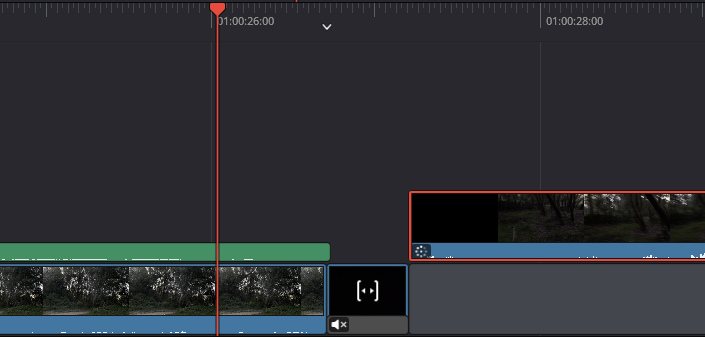
The transitions seemed too subtle, one clip would just cut to the next one. I wanted the shot changes to be a lot more noticeable, jarring even, so I added in some completely black and quiet shots, and experimented a little with their length.
I then moved on to the colours. I wanted to give the whole video a sort of blueish, greyish hue, which I thought would fit very well with the horror atmosphere I was going for. Finding the hue editor was a bit tricky, I needed a YouTube tutorial for that. The results were very worth it though, because the video instantly looked a lot more gloomy and scary.

Upon watching the whole video from start to finish, I realised that the contrast between the objective, static shots and the subjective, running shots, wasn't as stark as I would have liked. To really achieve that contrast, I got the idea to play with the sound a little. The cuts between shots were obvious, with the quiet black shots in between them. I somehow needed to create a clear, audible difference between the objective and subjective shots as well. So what I did was mute the audio of the objective shots and instead add some creepy piano music, which I downloaded from a royalty-free website.

The sound editing took a bit of work to get just right. I balanced the audio so that the subjective shots are louder, while the objective shots have the volume slightly turned down, which makes the subjective shots appear even more jarring. I also managed to add a fade effect to the music, in order for it to fit in better with the audio of the rest of the video.
Lastly, I added the credits at the beginning of the video, by inserting a picture and displaying it for a certain amount of time.

After Thoughts
Overall, working on this project was incredibly fun and very rewarding, from the planning to the filming and editing. It's been amazing slowly making progress with it and seeing it come together. And even though there are some things I could have done better, I'm really proud of how it turned out. I also learnt the basics of video editing, which will be very useful for future projects. Some things I wanna pay more attention to with my next project would be the footage: filming more footage and being more mindful of the way I film, taking some audio samples too, in case the audio in one of the clips isn't clear enough. I also want to work on the cohesiveness of my editing, because while this video is cohesive, it definitely has some flaws and mistakes I'd like to avoid in the future.
And lastly, here is my preliminary project.


Comments