


Preliminary Work - Mini Music Video - Final cut
- Feb 16
- 1 min read
In this post, I will walk you through the editing process of the music video's final cut.
First of all, I adjusted the colours a little; for most shots, I lifted the purple, to make it a little more vibrant.

Then I experimented with some of Da Vinci Resolve's predefined transitions, but in the end I only used the Blur Dissolve for some of the cuts, and decided to create my own transitions for the others. I used no transitions in between certain shots, because I wanted the cuts to be more sharp.

For the custom transitions, I had the idea of combining a pixellation effect with a sort of preview of the upcoming shot, overlayed on top of the current shot. I achieved this by making a copy of one shot, which I pasted in a different video track, so that it plays at the same time as the previous shot. I made the upcoming shot smaller, so that the current shot is still visible, and then added the Digital Glitch effect to the upcoming shot.

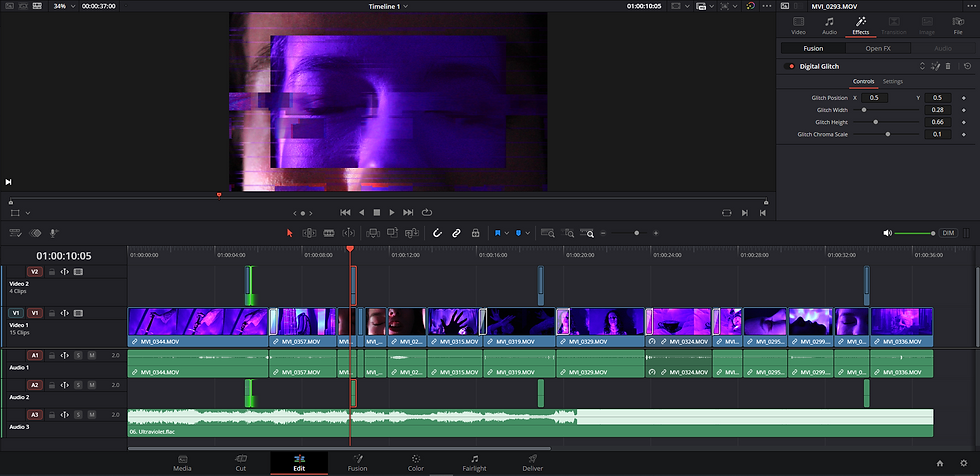
For the transition right before the chorus starts ('You wanna cover me in ultraviolet'), I knew I needed to do something more, to make the drop in the song even more impactful. So I used a combination of the custom transition I made earlier, with Da Vinci's predefined Camera Shake effect.

Lastly, I muted the audio of the footage, because I had forgotten to do so, and left only the audio track with the song be audible.

And here is the final cut:


Comments